AI expense management for global teams

Global expenses.Run by AI.Approved by you.

Employees send receipts on WhatsApp. Clara fills in the expense and checks it against your policy. Your team makes the call.

✓
Free for up to 5 users
✓
No credit card
✓
No US entity needed
In Mexico, Brazil or Colombia?
See Clara's local platform →

Illustration: an employee sends a receipt on WhatsApp. Clara reads it, fills in the expense and checks it against the company policy. The approver sees the result and makes the decision.
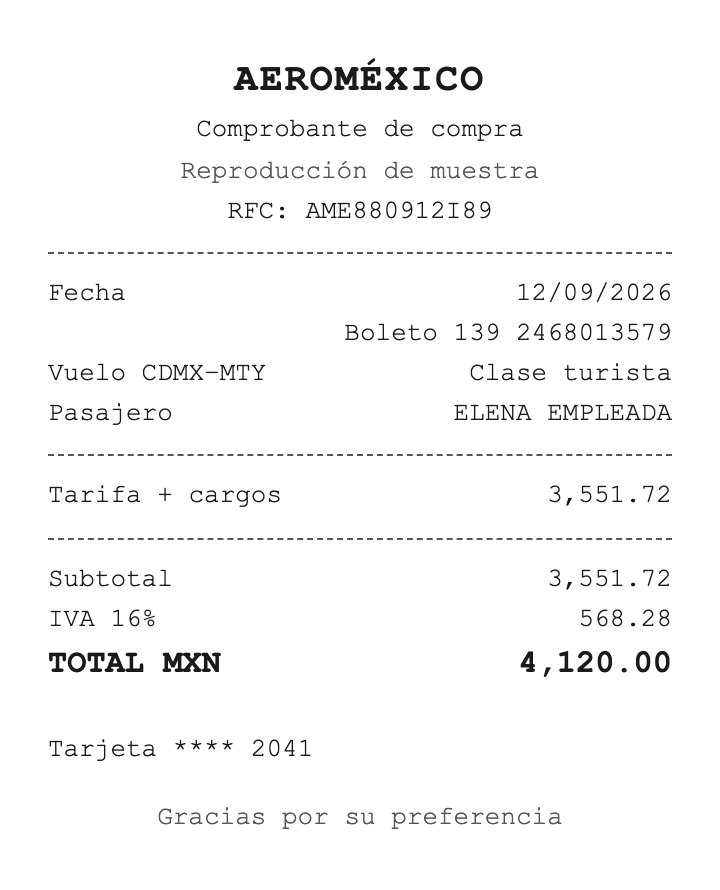
CDMX–Monterrey flight
Aeroméxico
MXN 4,120.00
Sep 12, 2026
Travel
4,120.00 MXN
568.28
AME880912I89
In policy
High confidence · Approve
Domestic flight for a client visit. Within travel policy, receipt attached.
Travel · manager approval
Mario Gerente
Manager · rule 2
Approved
#1E9E4A
approve
approved|Approved
false
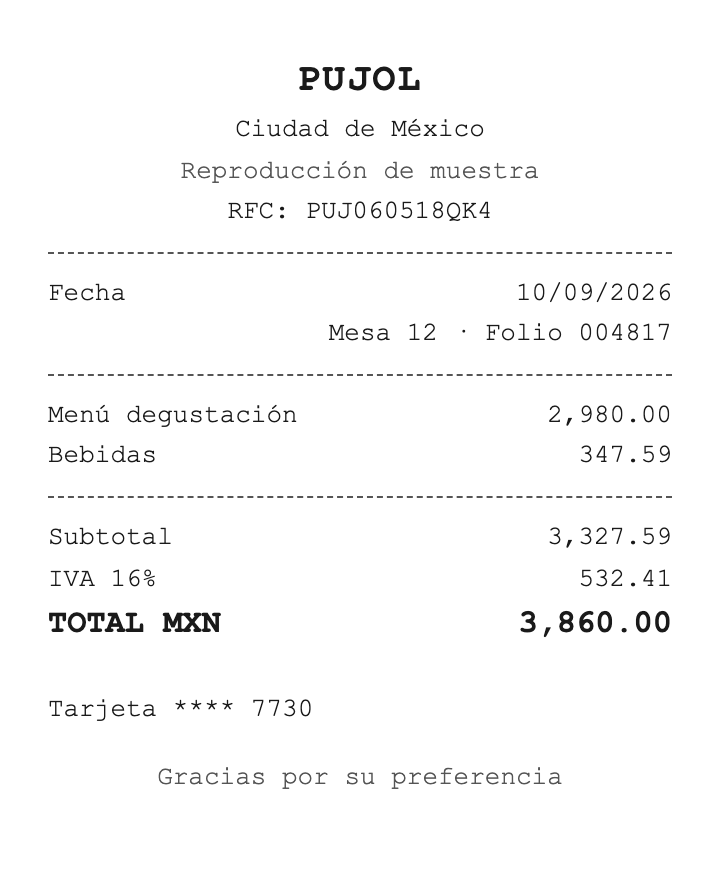
Lunch with client Grupo Solaris
Pujol
MXN 3,860.00
Sep 10, 2026
Client entertainment
3,860.00 MXN
532.41
PUJ060518QK4
Needs review
Medium confidence · Ask for context
Under the MX$5,000 cap, but high per guest. Confirm who attended.
Client entertainment · MX$5,000 per event
Alex Admin
Administrator · fallback rule
Asked for context
#1959D2
hold
pending|Pending approval
false
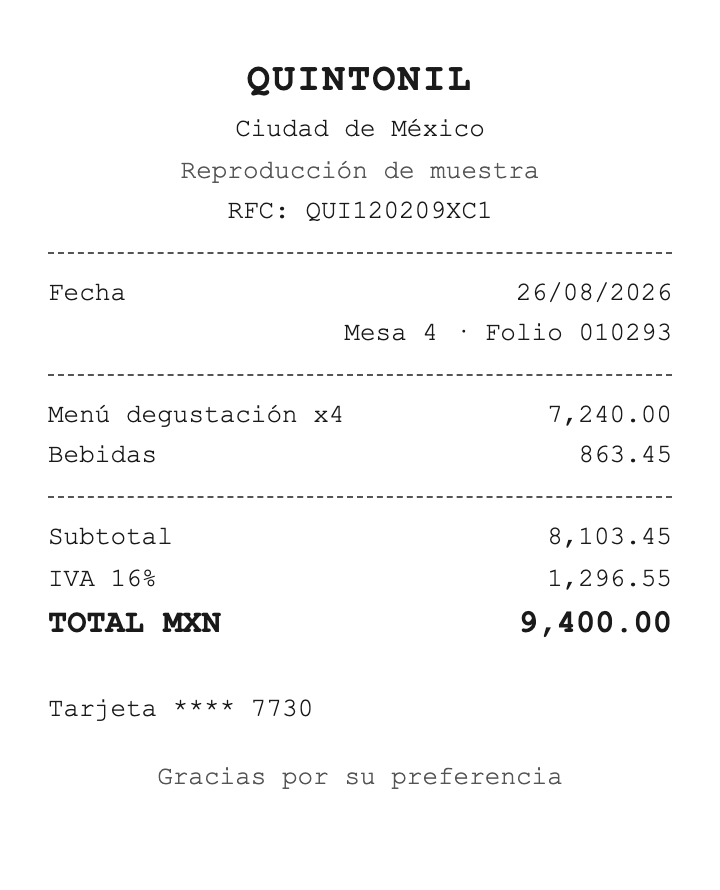
Closing dinner, three clients
Quintonil
MXN 9,400.00
Aug 26, 2026
Client entertainment
9,400.00 MXN
1,296.55
QUI120209XC1
Out of policy
High confidence · Consider rejecting
88% over the MX$5,000 per-event cap. No prior authorization.
Client entertainment · MX$5,000 per event
Mario Gerente
Manager · rejected
Rejected
#D92D20
reject
rejected|Rejected
true
40,000+
companies trust Clara

Receipt in. Payment report out.

No new bank, no new card. Clara does the busywork. Your team makes the calls.

Employee

Snap it. Send it.

A receipt photo on WhatsApp. Any country, any currency.

Clara

It fills itself in.

Date, merchant, category, amount and tax, read straight from the receipt.

Clara

Checked against your policy.

In policy, needs review or out of policy, with the reason. A person decides.

Approver

Routed by your rules.

The first matching rule wins. Anything else goes to an admin.

Finance

Paid from your own bank.

One payment report per currency, at the rate locked on submission.

Policy Agent
Pro

Describe your policy. Clara builds the rules.

Paste it, upload a PDF or write it in plain words. Nothing changes until you activate it.

Expense Policy
Save draft
Activate policy
Policy text
Northwind Studio
Caps by category
Category
Cap
Rule
Office
MX$1,000
Auto-approved under cap
Client entertainment
MX$5,000 / event
Name the client
Travel
No cap
Manager approves
Software
US$200 / license
Above: Accounting
Training
US$100
Above: manager first
Receipts
Upload within
5 business days
.
Thinking…
Proposed approval rules
5 rules
Auto-approve minor office expenses
Office · under MX$1,000
Auto-approve
Reject excessive entertainment
Over MX$5,000 per event
Auto-reject
Travel to the requester's manager
Category is Travel
Route
USD software to Accounting
Software billed in USD
Route
Fallback to administrator
Anything no rule catches
Route
Apply 5 rules
Multi-entity

One account. Every entity. Nothing leaks.

Each company keeps its own team, currency, rules and tax fields. Fully isolated.

Coverage

Borders are
a problem
a setting.

Employees submit from any country, in their own currency.

Reports your bank understands.

Grouped by currency and bank account. CLABE, CBU, IBAN and more.

In Mexico, Brazil or Colombia?
See Clara's local platform →
Expense alerts
Enterprise

Clara takes a second look. You make the call.

Unusual expenses get flagged before they're paid, each with a plain reason.

Amount outlier
Just under a limit
Round amount
Shared merchant
Possible duplicate
Audit anomaly
Policy flag
Suggestions, not verdicts.
Nothing blocks a payment.

Every country. Every currency. Every entity.

Explore all features →

Receipts on WhatsApp

Send a photo. Get a draft back. No app to download.

Locked FX

Transaction-date rate, locked at submission.

Avianca · EXP-0019
USD 785.00 → MXN 13,533.40

Approval chains

Multi-step or parallel, by amount, category, country or entity.

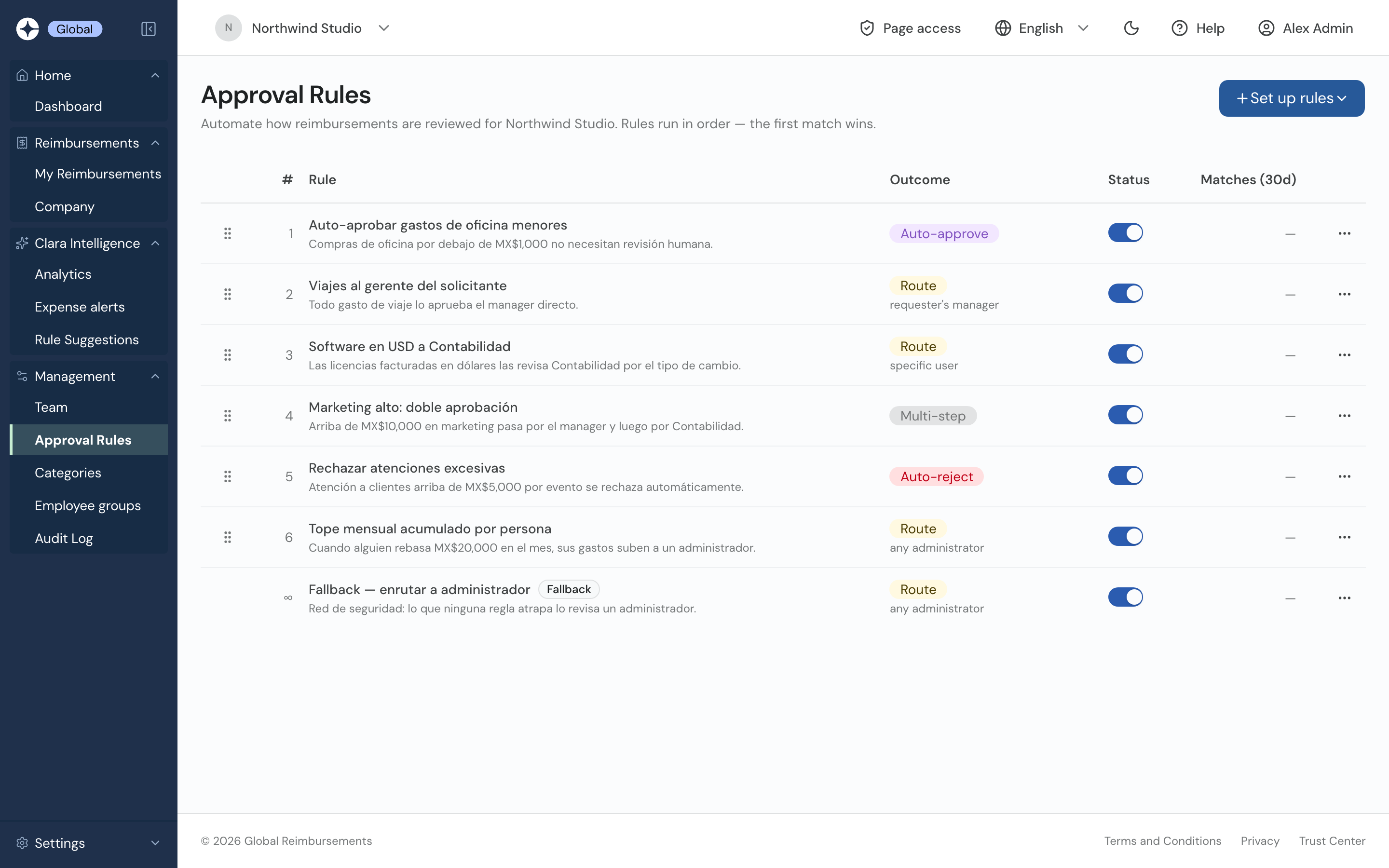
High marketing: double approval
Multi-step
Manager → Accounting

Full audit log

Who did what, and when. Exportable.

Sep 16 11:19
Expense submitted
Sep 16 11:18
Bank account updated
Sep 04 06:00
Expense approved

Four roles

Submit, approve, pay, control. Scoped per company.

Administrator
Accountant
Manager
Employee
Enterprise

Keep the cards you already have.

Card spend and out-of-pocket in one flow. No card migration.

Talk to sales →

VisaMastercardAmerican Express

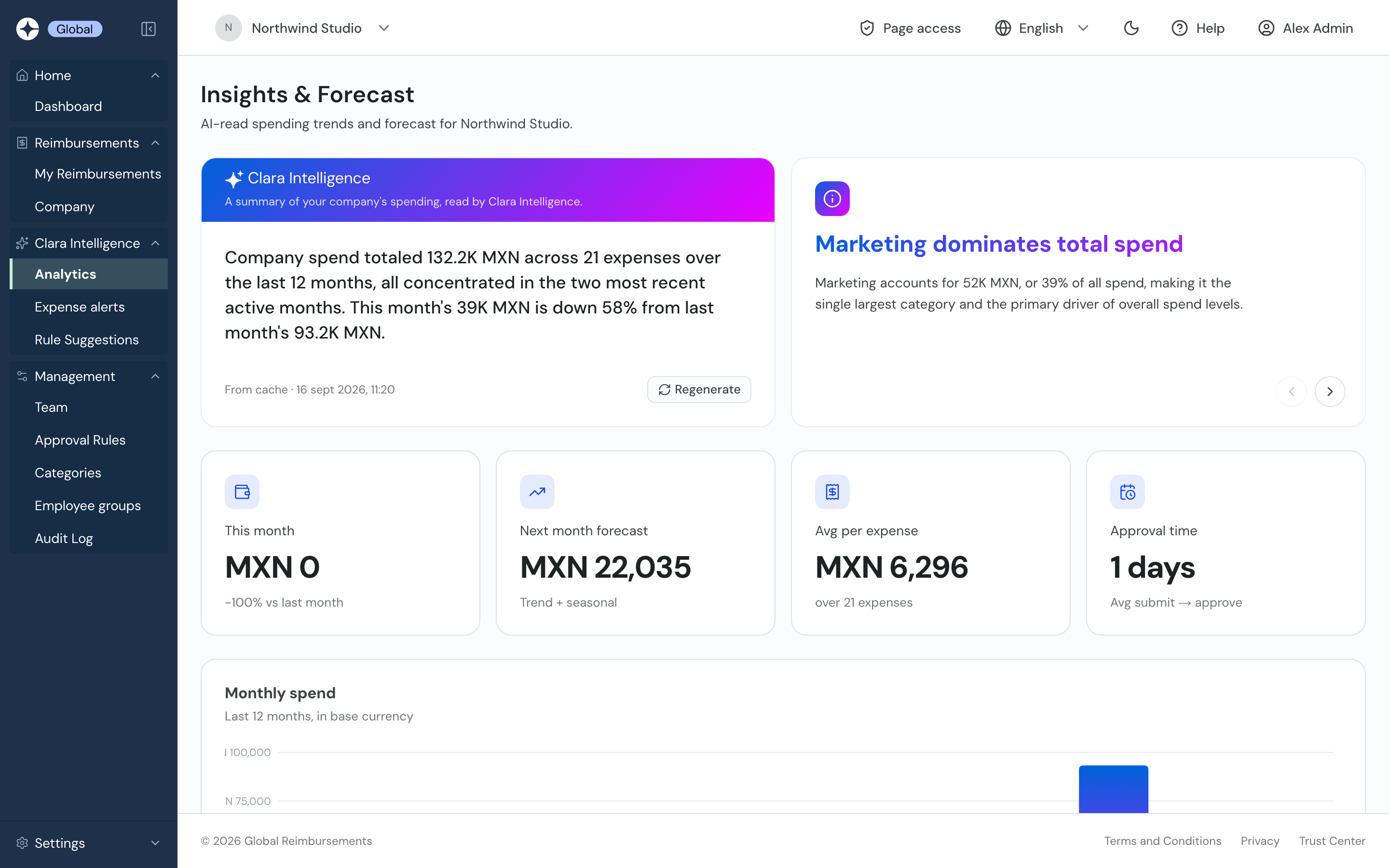
Your spending, explained before you ask.

A monthly read, a forecast and rules learned from how your team approves.

Monthly read
Company spend totaled 132.2K MXN across 21 expenses,
concentrated in the last two months.
This month's 39K MXN is down 58% from last month.
Sep 16, 2026
↻ Regenerate
i

Marketing drives total spend

52K MXN, or 39% of all spend.

Next month forecast
MXN 22,035
Avg approval time
1 day
High confidence

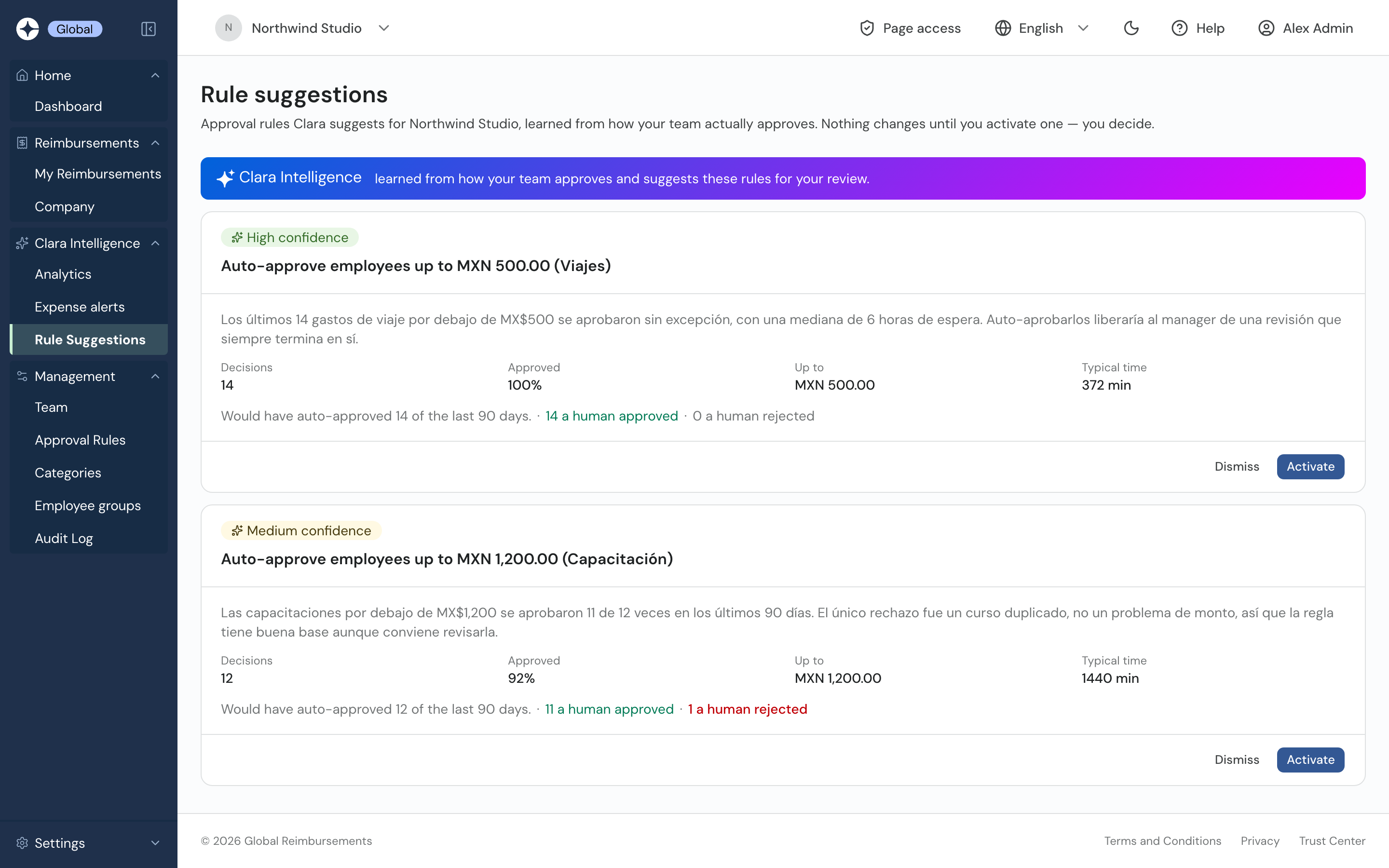
Auto-approve Travel up to MXN 500.00

Decisions
14
Approved
100%
Up to
MXN 500.00
Typical wait
6 h
Backtest, last 90 days: would have auto-approved 14 ·
14 approved by a human
· 0 rejected
Dismiss
Activate

Included in Enterprise · Demo data
The real product

Real screens. No mockups.

Open the live demo ↗
global.clara.com/dashboard
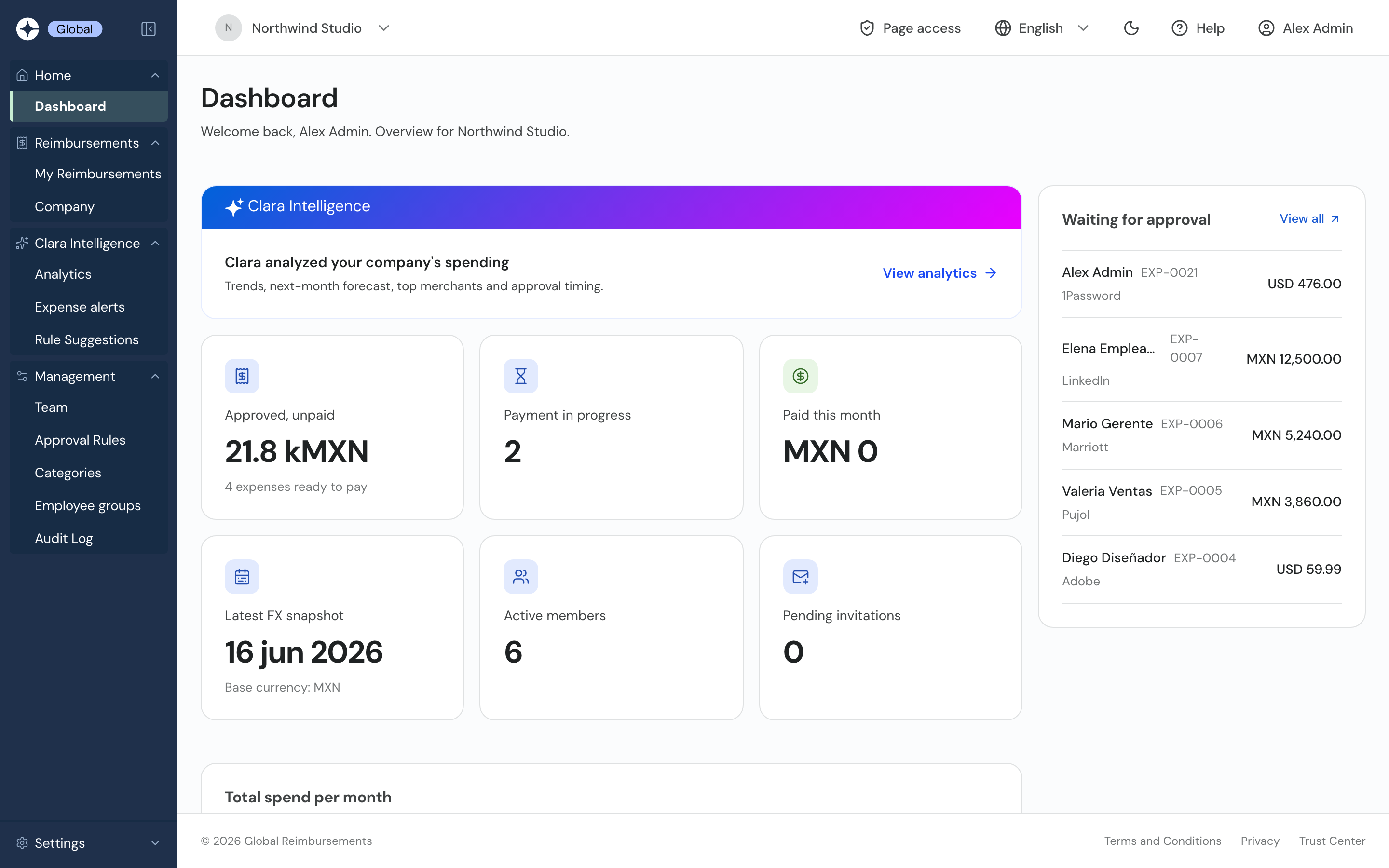
Clara Global dashboard for the demo company Northwind Studio: approved unpaid 21.8 kMXN, latest FX snapshot, monthly spend and the expenses waiting for approval
global.clara.com/configuration/rules
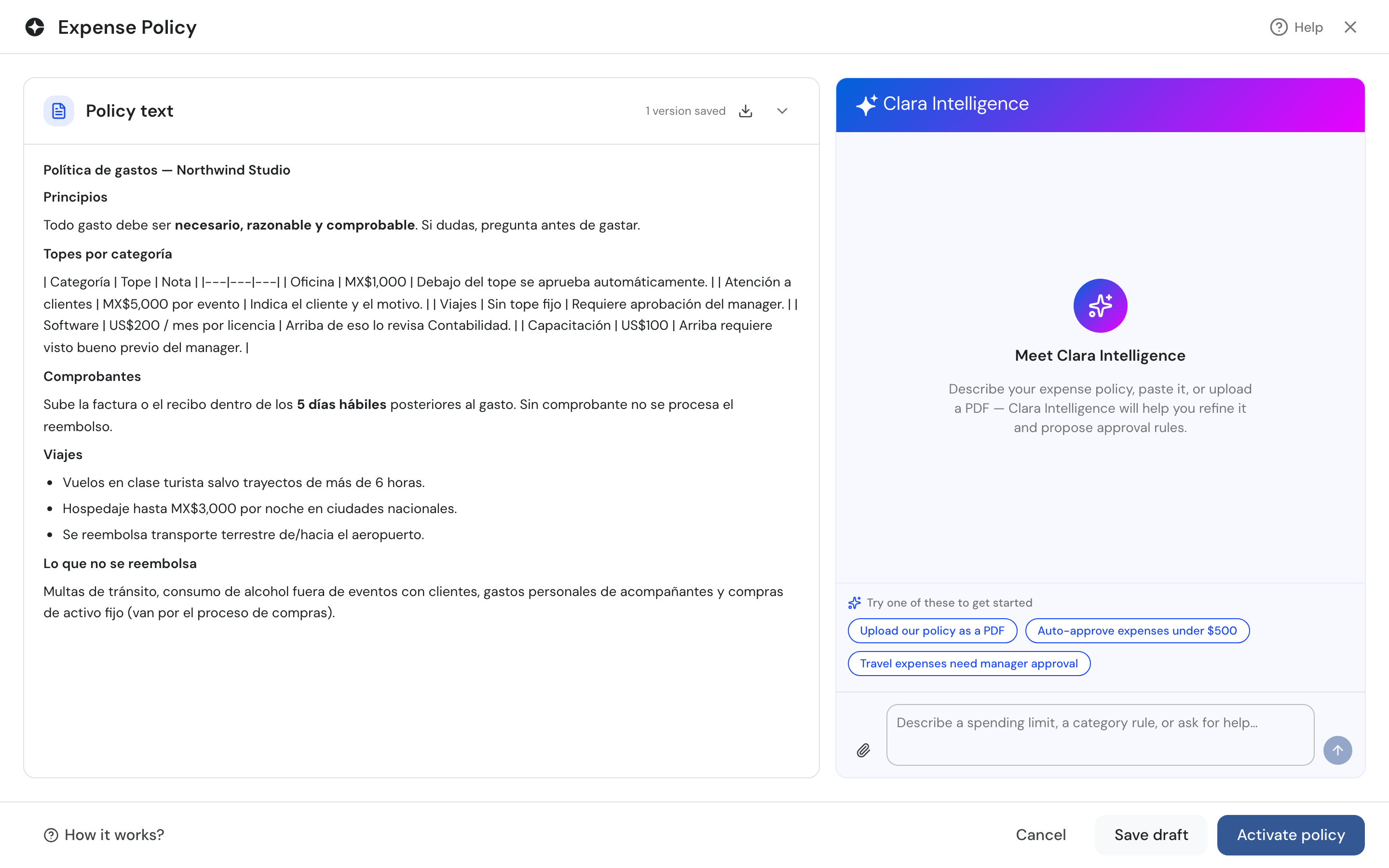
Expense Policy screen: the company's policy text next to the Clara Intelligence assistant that proposes approval rules
global.clara.com/configuration/expense-alerts
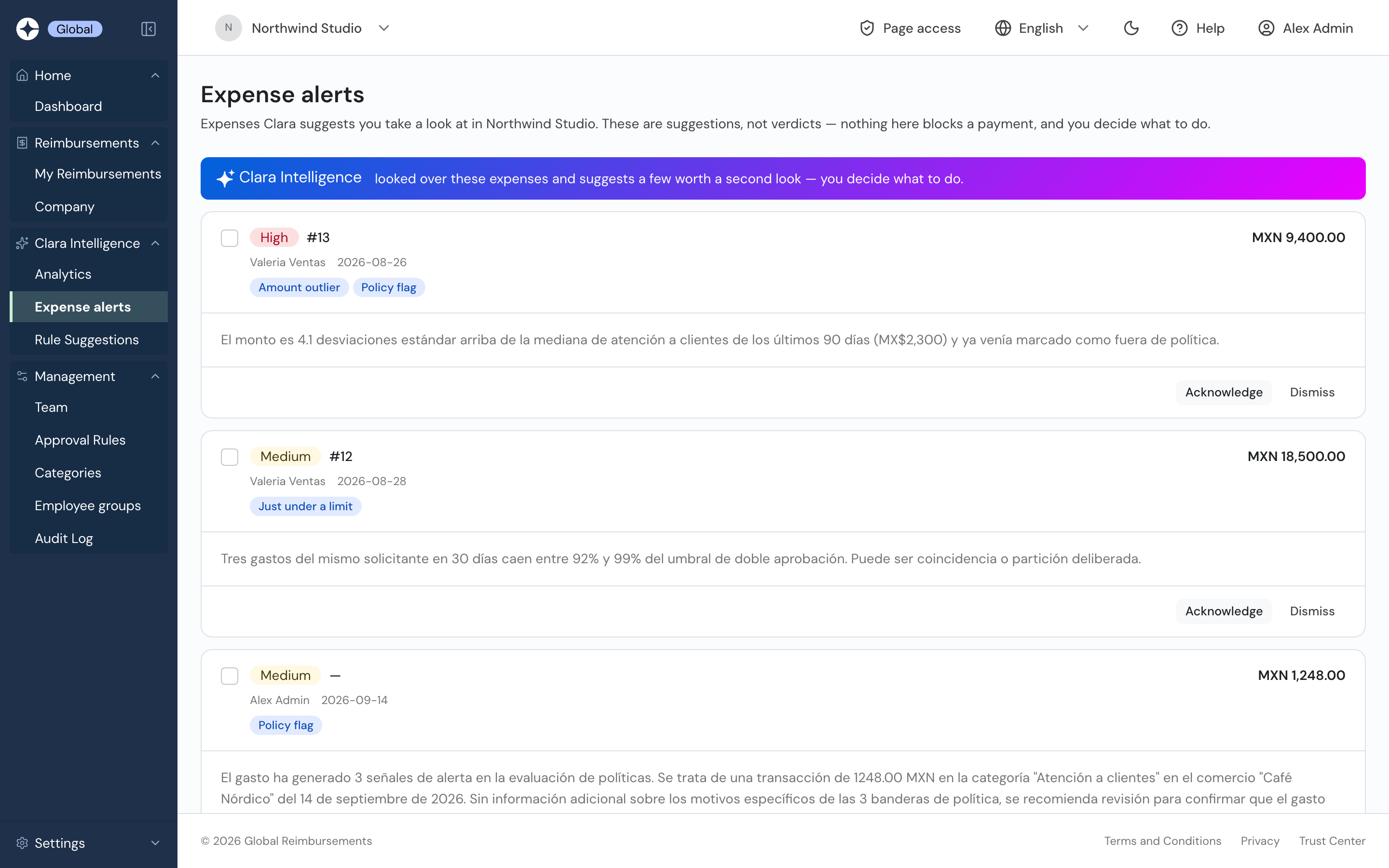
Expense alerts: expenses Clara suggests a second look at, with severity, signals such as Amount outlier and Policy flag, and the reason
global.clara.com/configuration/rule-proposals
Rule suggestions: approval rules Clara learned from past approvals, with confidence, decisions, approval rate and backtest
global.clara.com/analytics
Insights and Forecast: Clara Intelligence's written summary of company spending, top insight, next-month forecast and approval time
global.clara.com/configuration/rules
Approval rules list: auto-approve, route, multi-step and auto-reject rules that run in order, plus a fallback to an administrator

Unedited demo screens. Northwind Studio is a fictional Mexican company, so its content is in Spanish.

Security

Built for finance data.

◧

Data isolation

Each company's data is fully separated.

⌗

Field-level encryption

Bank accounts and tax IDs, encrypted one by one.

②

Two-factor authentication

Required for admins or your whole team.

≡

Full audit trail

Every approval, role change and payment, logged.

AI-native due diligence

Ask your AI about us.

Open a neutral prompt in your assistant. It checks clara.com/global first.

Prompt preview
I'm considering Clara Global (clara.com/global) as expense management software for my company, which has employees, contractors or legal entities in more than one country.
Help me evaluate whether Clara Global could be a good fit for a company like mine.
If you have web access, first consult Clara's official website (clara.com/global) and use it as the primary source for its capabilities and pricing. Clearly distinguish confirmed capabilities from potential benefits and from anything that depends on the plan. If something cannot be verified, say so rather than assuming it.
Give me a concise, practical explanation of:
- how employees submit expenses from different countries and currencies;
- how exchange rates, approval rules and multiple entities are handled;
- how reimbursements are paid, and what changes (or doesn't) on our banking side;
- what the Free, Pro and Enterprise plans include;
- and what I should validate before deciding.
Finish by asking me 3 short questions that would let you personalize the analysis, such as countries of operation, number of entities, current expense process and accounting/ERP tools.
Do not ask me for passwords, credentials, card or bank-account numbers, confidential financial information, or sensitive personal employee data.

Start free. Scale when you cross the next border.

Every plan: approval rules, FX, audit log and SSO.

Free

$0
forever

For small teams getting started.

✓
Up to 5 users · 1 entity
✓
WhatsApp receipts
✓
AI autocomplete
✓
Multi-currency payout reports
Start free

Pro Most popular

$99
$250
/mo

For teams across several entities.

✓
Policy Agent
✓
Employee groups
✓
Up to 50 users · 5 entities
✓
Included for Clara clients
Move to Pro

Enterprise Custom

Custom

For more entities and dedicated support.

✓
Expense alerts
✓
Monthly read + forecast
✓
Rule suggestions
✓
Bring your own cards
Talk to sales

Compare plans →

Straight answers.

Does Clara Global issue cards or move money?
+
No. It builds the payment report — grouped by currency and bank account — and your team pays from the bank you already use. On Enterprise, you can also bring the cards your bank already issued and run card spend and out-of-pocket claims in the same approval flow.
Do we need a US entity?
+
No. Sign up from wherever you operate. No US EIN, no new corporate card, no new bank account.
How are exchange rates handled?
+
We pull the rate for the expense’s transaction date from a market feed and lock it onto the claim the moment it’s submitted. That number doesn’t drift later — what the employee sees, what the approver signs off on, and what shows up on the payout report is the same amount.
What does the AI actually do?
+
It reads the receipt, fills in the basics, and checks the claim against your policy (Policy Agent on Pro). Odd ones get flagged for a human look. Approvals and payments stay with your people.

Your team is already global.
Your expenses should be too.

Free for up to 5 users. No credit card, no US entity, no change to your bank.